Best Practices for Digital Asset Management
Essential steps and tips for organizing and protecting your digital intellectual property.
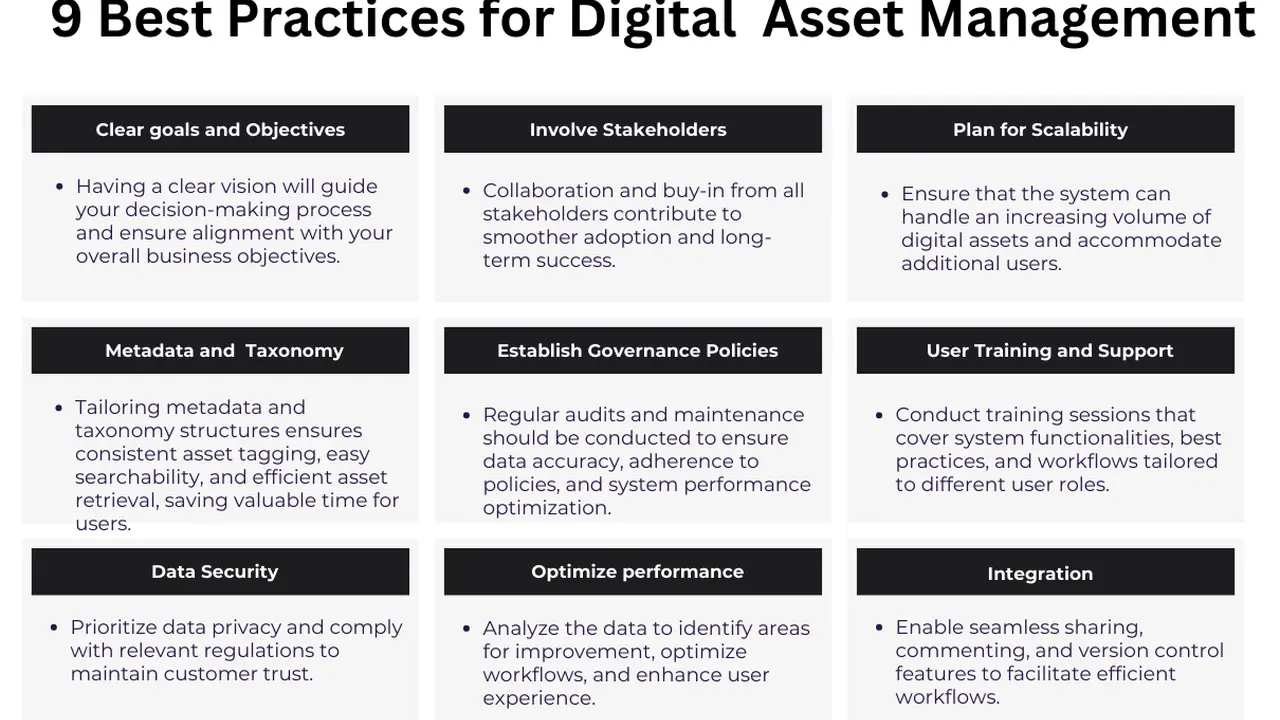
Essential steps and tips for organizing and protecting your digital intellectual property.
Best Practices for Digital Asset Management
Hey there, digital creators, entrepreneurs, and anyone swimming in a sea of files! Ever feel like your digital life is a chaotic mess? Photos scattered across hard drives, design files buried in old folders, marketing videos living on a forgotten cloud service? You’re not alone. In today’s digital-first world, managing your digital assets – everything from images and videos to documents, audio files, and even 3D models – has become absolutely crucial. This isn't just about keeping things tidy; it's about protecting your intellectual property, boosting your productivity, and ensuring your brand consistency. We're talking about Digital Asset Management, or DAM, and it's a game-changer.
Think about it: every photo you take, every logo you design, every piece of content you create holds value. It’s your intellectual property (IP), and it deserves to be organized, accessible, and secure. Without a solid DAM strategy, you risk losing valuable assets, wasting time searching for files, and even facing legal headaches if your IP isn't properly managed. So, let's dive deep into the best practices for Digital Asset Management, covering everything from why it matters to specific tools and real-world scenarios. Get ready to bring some order to your digital universe!
Why Digital Asset Management Matters Protecting Your Creative Work
Before we get into the 'how,' let's quickly touch on the 'why.' Why should you care about DAM? Well, for starters, it's about protecting your creative work. Your digital assets are often the embodiment of your brand, your ideas, and your hard work. Losing them, misplacing them, or having them used improperly can have serious consequences. A robust DAM system helps you:
- Safeguard Intellectual Property: By centralizing and securing your assets, you reduce the risk of unauthorized use, theft, or accidental deletion. You can implement access controls, track usage, and maintain clear ownership records.
- Improve Efficiency and Productivity: Imagine instantly finding that specific version of your logo, or that high-resolution product shot, without digging through countless folders. DAM saves you and your team countless hours, allowing you to focus on creation, not searching.
- Maintain Brand Consistency: Ensure everyone in your organization, from marketing to sales, is using the most current and approved versions of your brand assets. This is vital for a cohesive brand image across all platforms.
- Enhance Collaboration: Teams can easily share, review, and collaborate on assets, regardless of their location. This is especially important for remote teams or those working with external agencies.
- Streamline Workflows: Integrate your DAM system with other tools like content management systems (CMS), project management software, and design applications to create seamless workflows.
- Future-Proof Your Assets: As technology evolves, file formats change. A good DAM system helps you manage different versions and ensures your assets remain accessible and usable for years to come.
Whether you're a solo freelancer, a small business, or a large enterprise, the benefits of effective DAM are undeniable. It's an investment in your future and the integrity of your digital presence.
Getting Started with DAM Defining Your Digital Assets and Needs
Okay, so you're convinced. Now, where do you begin? The first step is to understand what you're dealing with. This isn't a one-size-fits-all solution; your DAM strategy needs to be tailored to your specific assets and organizational needs.
Inventory Your Digital Assets What Do You Have
Start by taking stock. What kind of digital assets do you possess? This could include:
- Images: Photos, illustrations, infographics, logos, banners, product shots.
- Videos: Marketing videos, tutorials, testimonials, animations, raw footage.
- Audio: Podcasts, voiceovers, sound effects, music tracks.
- Documents: PDFs, Word documents, presentations, whitepapers, contracts.
- Design Files: PSDs, AI files, Sketch files, Figma designs.
- Web Assets: HTML, CSS, JavaScript files, favicons.
- 3D Models: For product visualization or architectural rendering.
Don't forget about different versions of these assets – drafts, final versions, versions optimized for web, print, or social media. It's a lot, right? But knowing what you have is the first step to organizing it.
Identify Your Users and Their Needs Who Needs What
Who will be using these assets? Marketing teams, sales, product development, legal, external agencies, freelancers? Each group will have different needs and access levels. For example:
- Marketing: Needs quick access to approved brand assets, campaign images, and video clips for social media and advertising.
- Sales: Requires up-to-date product images, brochures, and presentations for client pitches.
- Designers: Needs access to raw design files, brand guidelines, and previous project assets.
- Legal: May need to review contracts, usage rights, and ensure compliance.
Understanding these user roles will help you define access permissions and tailor the DAM system to their workflows.
Define Your Goals What Do You Want to Achieve
What are your primary objectives for implementing DAM? Is it to:
- Reduce time spent searching for files?
- Ensure brand consistency?
- Improve collaboration?
- Protect against IP infringement?
- Streamline content creation workflows?
Having clear goals will guide your selection of a DAM system and help you measure its success.
Core DAM Best Practices Organizing and Securing Your Assets
Once you've assessed your needs, it's time to implement some core best practices. These are the foundational elements of any successful DAM strategy.
Standardize Naming Conventions Consistency is Key
This might sound basic, but it's incredibly powerful. Establish clear, consistent naming conventions for all your digital assets. This makes files easier to find, understand, and manage. For example, instead of 'IMG_001.jpg' or 'final_logo_new.png,' use something like 'ProjectX_CampaignY_HeroImage_V3_Web.jpg' or 'Brand_Logo_Primary_CMYK.eps'.
Consider including:
- Project name or ID
- Asset type (e.g., photo, video, document)
- Content description
- Version number
- Usage (e.g., web, print, social)
Document these conventions and ensure everyone on your team adheres to them.
Implement Robust Metadata Tagging Enhancing Discoverability
Metadata is data about data. It's the secret sauce that makes your assets searchable and discoverable. Instead of just relying on file names, add descriptive tags, keywords, and attributes to each asset. This is where a good DAM system truly shines.
Examples of metadata:
- Keywords: 'beach,' 'sunset,' 'team meeting,' 'product launch'
- Description: A brief summary of the asset's content.
- Creator: Who created the asset.
- Date Created/Modified: When the asset was made or last updated.
- Usage Rights: Licensing information, expiration dates, restrictions.
- Categories/Collections: Grouping assets by theme, project, or department.
- File Type/Format: JPEG, PNG, MP4, PDF.
The more comprehensive and consistent your metadata, the easier it will be to find specific assets, even years down the line. Many DAM systems offer AI-powered auto-tagging, which can be a huge time-saver.
Centralize Your Assets Single Source of Truth
No more assets scattered across individual hard drives, Dropbox folders, Google Drive, and various cloud services. A core principle of DAM is to create a single, centralized repository for all your digital assets. This 'single source of truth' ensures everyone is accessing the same, most up-to-date versions of files.
This centralization also simplifies backup, security, and version control.
Establish Clear Access Permissions and User Roles Security First
Not everyone needs access to every asset. Implement a robust system of user roles and permissions. For example:
- Admins: Full control over the DAM system, including user management and settings.
- Editors: Can upload, edit metadata, and manage assets within their assigned categories.
- Viewers: Can browse and download approved assets.
- External Users: Limited access to specific collections for collaborators or clients.
This prevents unauthorized access, accidental deletions, and ensures that sensitive or proprietary assets are protected.
Implement Version Control and Archiving Tracking Changes and Preserving History
Digital assets are rarely static. They evolve through multiple iterations. A good DAM system provides robust version control, allowing you to:
- Track changes made to an asset.
- Revert to previous versions if needed.
- See who made what changes and when.
Additionally, establish an archiving strategy for older or unused assets. Don't just delete them; move them to an archive where they can still be accessed if necessary, but don't clutter your active library.
Regularly Audit and Clean Up Your DAM System Keep It Tidy
A DAM system isn't a 'set it and forget it' solution. Regular maintenance is essential. Schedule periodic audits to:
- Remove duplicate files.
- Update outdated metadata.
- Archive old assets.
- Ensure naming conventions are being followed.
- Check for broken links or corrupted files.
A clean and well-maintained DAM system remains efficient and effective.
Choosing the Right DAM Solution Comparing Top Platforms and Their Features
Now for the exciting part: picking a DAM system! There are many options out there, ranging from simple cloud storage with some DAM features to enterprise-level solutions. Your choice will depend on your budget, the complexity of your assets, and your team's size and needs.
Here's a look at some popular DAM platforms, their typical use cases, and what makes them stand out:
1. Adobe Experience Manager Assets A Robust Enterprise Solution
Use Case: Large enterprises, global brands, organizations with complex content workflows and extensive digital asset libraries. Often integrated with other Adobe Creative Cloud and marketing tools.
Key Features:
- Advanced AI and Machine Learning: For intelligent tagging, smart cropping, and content recommendations.
- Deep Integration with Adobe Creative Cloud: Seamless workflows for designers using Photoshop, Illustrator, InDesign, etc.
- Robust Workflow Automation: Automate asset approvals, transformations, and distribution.
- Comprehensive Rights Management: Detailed tracking of asset licenses and usage restrictions.
- Scalability: Designed to handle massive volumes of assets and users.
- Dynamic Media Delivery: Automatically optimize assets for different channels and devices.
Pros: Unparalleled integration with Adobe ecosystem, powerful automation, enterprise-grade security and scalability. Excellent for organizations heavily invested in Adobe products.
Cons: High cost, steep learning curve, can be overkill for smaller businesses. Requires significant IT resources for implementation and maintenance.
Typical Pricing: Enterprise-level, custom quotes based on usage, storage, and features. Expect to pay tens of thousands to hundreds of thousands of dollars annually.
2. Bynder A User-Friendly Cloud-Native DAM
Use Case: Mid-sized to large businesses, marketing teams, agencies, and brands that prioritize ease of use, brand consistency, and efficient content distribution.
Key Features:
- Intuitive User Interface: Known for its clean and easy-to-navigate design.
- Brand Guidelines Module: Centralize and enforce brand standards directly within the DAM.
- Creative Workflow Tools: Streamline asset creation, review, and approval processes.
- Digital Brand Templates: Allow users to create on-brand materials without design software.
- Extensive Integrations: Connects with CMS, PIM, marketing automation, and social media platforms.
- Advanced Search and Filtering: Powerful metadata-driven search capabilities.
Pros: Excellent user experience, strong focus on brand management, good for collaboration, cloud-native for easy access.
Cons: Can be pricey for smaller teams, some advanced features might require add-ons.
Typical Pricing: Mid-market to enterprise. Custom pricing based on storage, users, and features. Starts from a few hundred dollars per month for smaller teams, scaling up to thousands for larger organizations.
3. Canto A Long-Standing and Versatile DAM
Use Case: Businesses of all sizes, from small teams to large enterprises, looking for a flexible and scalable DAM solution with a strong focus on visual assets.
Key Features:
- Visual-Centric Interface: Optimized for managing and previewing images and videos.
- Smart Tags and AI Features: Automatic tagging and facial recognition to enhance search.
- Portals and Collections: Easily share curated sets of assets with internal and external stakeholders.
- Version Control and Audit Trails: Track asset history and user activity.
- Integrations: Connects with popular tools like Adobe Creative Cloud, Microsoft Office, and various CMS platforms.
- Flexible Deployment: Available as a cloud solution or on-premise.
Pros: Highly customizable, strong visual management capabilities, good for diverse asset types, reliable and established vendor.
Cons: Interface can feel a bit dated compared to newer cloud-native solutions, pricing can add up with many add-ons.
Typical Pricing: Varies widely. Cloud plans can start from around $300-$500 per month for smaller teams, with enterprise solutions costing significantly more. On-premise licenses are also available.
4. Brandfolder by Smartsheet A Modern and Collaborative DAM
Use Case: Marketing teams, creative agencies, and growing businesses that need a modern, intuitive DAM with strong collaboration features and integration with project management.
Key Features:
- Visually Appealing Interface: Designed for easy browsing and discovery of assets.
- AI-Powered Search and Tagging: Automatically categorizes and tags assets.
- Brand Guidelines Enforcement: Ensure brand consistency with built-in tools.
- Templating and Customization: Create branded templates for easy content generation.
- Robust Analytics: Track asset usage, downloads, and performance.
- Integration with Smartsheet: Seamlessly connect with project management workflows.
Pros: Modern UI, strong analytics, good for collaboration, excellent integration with Smartsheet for project management.
Cons: Can be more expensive than basic solutions, might lack some niche features found in highly specialized DAMs.
Typical Pricing: Mid-market to enterprise. Custom pricing based on storage, users, and features. Generally starts in the range of $700-$1000+ per month.
5. Cloudinary A Developer-Focused Media Management Platform
Use Case: Developers, e-commerce businesses, media companies, and anyone needing advanced image and video optimization, transformation, and delivery at scale.
Key Features:
- Powerful Image and Video API: Programmatically upload, manage, transform, and deliver media.
- Automatic Optimization: Delivers images and videos in the best format and quality for each device.
- AI-Powered Transformations: Smart cropping, background removal, content-aware resizing.
- Digital Asset Management Capabilities: Organize, tag, and search assets.
- CDN Integration: Fast global delivery of media assets.
- Version Control and Backup: Manage different versions and ensure data safety.
Pros: Unmatched media optimization and delivery capabilities, highly scalable, developer-friendly, excellent for performance-critical applications.
Cons: Can be complex for non-technical users, core DAM features are present but not as extensive as dedicated DAMs for marketing teams.
Typical Pricing: Freemium model with paid plans based on usage (storage, transformations, bandwidth). Free tier available. Paid plans start from around $99/month for basic usage, scaling up to thousands for high-volume enterprise needs.
6. Google Drive Dropbox OneDrive Simple Cloud Storage with Basic DAM Features
Use Case: Individuals, small teams, and startups with limited budgets and relatively simple asset management needs. Good for general file storage and sharing.
Key Features:
- File Storage and Sync: Store and synchronize files across devices.
- Basic Sharing and Collaboration: Share files and folders with others, real-time document editing (Google Workspace).
- Version History: Track changes and revert to previous versions.
- Search Functionality: Basic keyword search.
- Integration with Office Suites: Seamlessly works with Google Docs, Sheets, Slides, or Microsoft Office apps.
Pros: Affordable (often free for basic tiers), easy to use, widely adopted, good for general file sharing.
Cons: Lacks advanced DAM features like robust metadata, detailed access control, workflow automation, brand guidelines enforcement, and comprehensive analytics. Can quickly become disorganized without strict manual discipline.
Typical Pricing: Free tiers available. Paid plans typically start from $10-$20 per user per month for increased storage and features.
Choosing Your DAM The Decision Process
When evaluating these (or any other) DAM solutions, consider these factors:
- Scalability: Can it grow with your asset library and team?
- Integrations: Does it connect with your existing tools (CMS, CRM, design software)?
- User Experience: Is it intuitive and easy for your team to adopt?
- Security: What are its security protocols and backup strategies?
- Support: What kind of customer support is available?
- Pricing Model: Does it fit your budget and offer good value for the features?
- Specific Features: Do you need advanced AI tagging, video transcoding, or specific rights management?
Many DAM providers offer free trials or demos. Take advantage of these to test the platform with your actual assets and team members.
Implementing Your DAM System A Step-by-Step Guide
Once you've chosen your DAM, the implementation phase is critical. It's not just about flipping a switch; it requires careful planning and execution.
1. Plan Your Migration Strategy Moving Your Assets
How will you get your existing assets into the new DAM? This can be a massive undertaking. Consider:
- Phased Migration: Start with your most critical or frequently used assets first.
- Data Cleansing: Before migrating, clean up your existing assets. Delete duplicates, outdated files, and low-quality versions.
- Metadata Mapping: If you have existing metadata, plan how it will map to the new DAM's structure.
- Automated vs. Manual Uploads: For large volumes, automated tools are essential. For smaller libraries, manual uploads might suffice.
Don't rush this step. A well-planned migration prevents headaches down the line.
2. Train Your Team User Adoption is Key
A DAM system is only as good as its users. Provide comprehensive training to everyone who will interact with the system. This includes:
- Basic Navigation: How to find, view, and download assets.
- Uploading and Tagging: How to properly upload new assets and apply metadata.
- Version Control: Understanding how to manage different versions.
- Access Permissions: What users can and cannot do.
- Best Practices: Reinforce naming conventions and metadata standards.
Offer ongoing support and create internal documentation or FAQs to help users.
3. Integrate with Existing Workflows Seamless Operations
To maximize the value of your DAM, integrate it with your other essential tools. This could include:
- Content Management Systems (CMS): For websites and blogs (e.g., WordPress, Drupal, Adobe Experience Manager Sites).
- Project Management Tools: For task management and collaboration (e.g., Asana, Trello, Smartsheet).
- Marketing Automation Platforms: For email campaigns and lead generation (e.g., HubSpot, Marketo).
- Design Software: For creative teams (e.g., Adobe Creative Cloud apps).
- E-commerce Platforms: For product images and videos (e.g., Shopify, Magento).
These integrations create a more efficient and connected ecosystem for your content.
4. Monitor and Optimize Continuous Improvement
Once your DAM is up and running, don't just leave it. Continuously monitor its performance and gather feedback from users. Look at metrics like:
- Asset Usage: Which assets are most popular?
- Search Queries: What are users searching for? Are they finding what they need?
- Upload Rates: Are new assets being added consistently?
- User Feedback: What are the pain points? What features are missing?
Use this data to refine your metadata strategy, improve workflows, and ensure your DAM system continues to meet your evolving needs.
Advanced DAM Strategies Maximizing Your Investment
Beyond the basics, there are advanced strategies that can further enhance your DAM system's value.
Leverage AI and Machine Learning Smart Automation
Many modern DAMs incorporate AI and machine learning to automate tedious tasks. This includes:
- Auto-Tagging: AI can analyze images and videos to automatically apply relevant keywords and tags.
- Facial Recognition: Identify individuals in photos for easier searching.
- Object Recognition: Identify objects within images (e.g., 'car,' 'building,' 'coffee cup').
- Smart Cropping and Resizing: Automatically generate different asset variations for various platforms.
- Duplicate Detection: Identify and flag duplicate assets.
These features save immense time and improve the accuracy of your metadata.
Implement a Digital Rights Management DRM Strategy Protecting Your IP
For assets with specific licensing or usage restrictions, integrate a robust Digital Rights Management (DRM) strategy within your DAM. This allows you to:
- Track Licenses: Record expiration dates and usage terms for stock photos, music, or licensed content.
- Automate Alerts: Receive notifications when licenses are about to expire.
- Restrict Usage: Prevent users from downloading or using assets outside of their approved terms.
- Watermarking: Apply watermarks to preview assets to prevent unauthorized use.
This is crucial for avoiding legal issues and ensuring compliance.
Optimize for SEO and Content Syndication Expanding Reach
Your DAM can play a role in your SEO strategy. By ensuring your images and videos have rich, descriptive metadata (including alt text for images), you make them more discoverable by search engines. Some DAMs can also help with content syndication, pushing approved assets to various platforms and channels automatically.
Consider a PIM Integration for Product-Centric Businesses Product Information Management
If you're an e-commerce business or deal with a large catalog of products, consider integrating your DAM with a Product Information Management (PIM) system. A PIM manages all product-related data (SKUs, descriptions, pricing), while the DAM handles the associated rich media (images, videos, 3D models). This integration ensures that product information and assets are always in sync and accurate across all sales channels.
Real-World Scenarios How DAM Transforms Operations
Let's look at a couple of examples to see how DAM makes a difference.
Scenario 1 A Global Marketing Campaign
Imagine a multinational company launching a new product. The marketing team needs to create assets for various regions, languages, and platforms (website, social media, print ads, TV commercials). Without DAM, this would be a nightmare of email attachments, shared drives, and version confusion.
With a DAM system like Adobe Experience Manager Assets or Bynder:
- All approved brand logos, product shots, and campaign videos are centralized.
- Regional teams can access and download localized versions of assets.
- Designers use templates to create on-brand social media graphics in minutes.
- Usage rights for stock photography are tracked, preventing legal issues.
- Analytics show which assets are performing best in different markets.
The result? A consistent global brand message, faster campaign launches, and reduced operational costs.
Scenario 2 An E-commerce Business with Thousands of Products
An online retailer sells thousands of products, each with multiple images, 360-degree views, and product videos. Managing these assets manually is impossible.
Using a platform like Cloudinary integrated with a DAM or a dedicated DAM like Canto:
- Product images are automatically optimized for web and mobile, ensuring fast loading times.
- AI-powered tagging helps customers find products through visual search.
- New product images are uploaded and automatically resized for various e-commerce platforms.
- Version control ensures that only the latest product shots are displayed.
- Developers can easily access and integrate media assets via API.
This leads to a better customer experience, higher conversion rates, and a more efficient product catalog management process.
Wrapping It Up Your Digital Asset Journey
Digital Asset Management isn't just a buzzword; it's a fundamental necessity for anyone creating, managing, or distributing digital content. By implementing these best practices – from standardizing naming conventions and leveraging metadata to choosing the right platform and continuously optimizing your system – you're not just organizing files. You're protecting your intellectual property, empowering your teams, and building a more efficient, consistent, and future-proof digital presence.
So, take the plunge! Start small if you need to, but start bringing order to your digital assets. Your future self (and your team) will thank you for it. Happy organizing!
:max_bytes(150000):strip_icc()/277019-baked-pork-chops-with-cream-of-mushroom-soup-DDMFS-beauty-4x3-BG-7505-5762b731cf30447d9cbbbbbf387beafa.jpg)